POWER BI • BUSINESS INTELLIGENCE
Student Scholarship & Academic Performance Analytics
An interactive Power BI dashboard designed to analyze student scholarship distribution, academic performance, campus differences and scholarship-related risks.
Project Overview
This project focuses on analyzing student scholarship information and academic performance to provide a clearer view of scholarship allocation, student performance and potential funding risks.
Tools & Technologies
Power BI
DAX
Power Query
Microsoft Excel
Business Problem
The objective was to transform student and scholarship information into an interactive analytical report that could help decision-makers understand student numbers, scholarship categories, academic performance and potential scholarship retention risks.
Data Preparation
The data required preparation before analysis. The process included reviewing data quality, identifying inconsistencies, handling missing information and preparing fields for analysis in Power BI.
Analysis
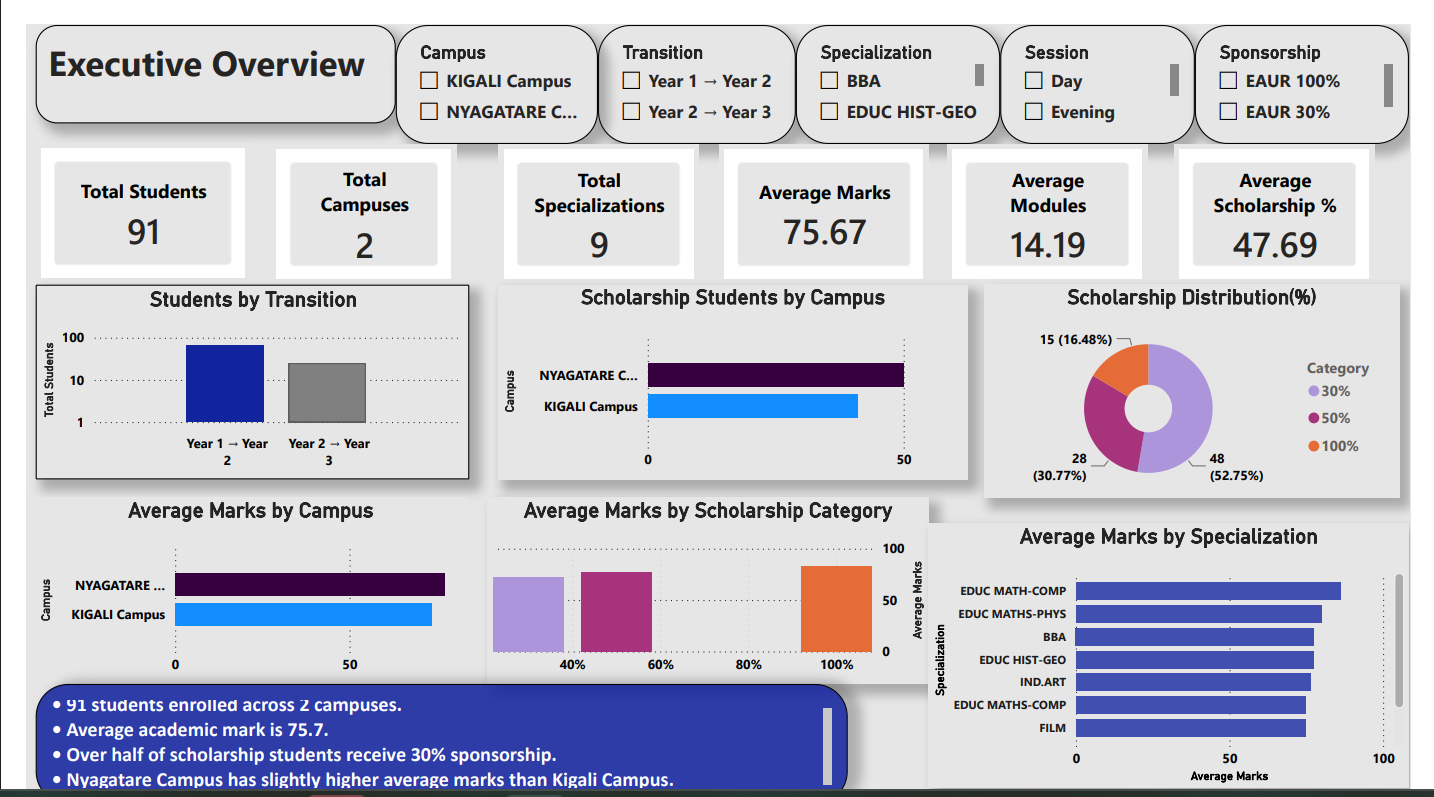
The dashboard was designed to allow users to examine scholarship distribution, student performance and differences between campuses through interactive visualizations and filters.
Key Findings
Student Performance
The dashboard provides an overview of academic performance and allows performance patterns to be examined across different student groups.
Campus Comparison
Academic performance and scholarship participation can be compared across campuses to identify differences and areas that may require further attention.
Scholarship Distribution
Scholarship participation is distributed across different sponsorship categories, providing visibility into the composition of the scholarship population.
Student Transitions
The dashboard provides visibility into student progression between academic levels, supporting analysis of transition patterns and progression performance.
Specialization Performance
Academic performance can also be examined by specialization, helping identify differences in performance across academic areas.
Interactive Analysis
Interactive filters allow users to explore the data by campus, transition, specialization, session and sponsorship category.
Business Value
The dashboard provides a centralized view of scholarship and academic information, making it easier to identify patterns, compare campuses, monitor performance and support funding-related decisions.